
Call management is deciding, ahead of time, what happens to every call: who the phone rings, for how long, what the caller hears, and where the call lands if nobody picks up. Done well, a caller never hits a dead end and nobody on your team is interrupted for a call that did not need them.
An example: a call flow from our own business line, drawn the way we build and adjust them. On a computer, click the diagram to see it full screen. On a phone, tap it, then pinch to zoom in on any step.
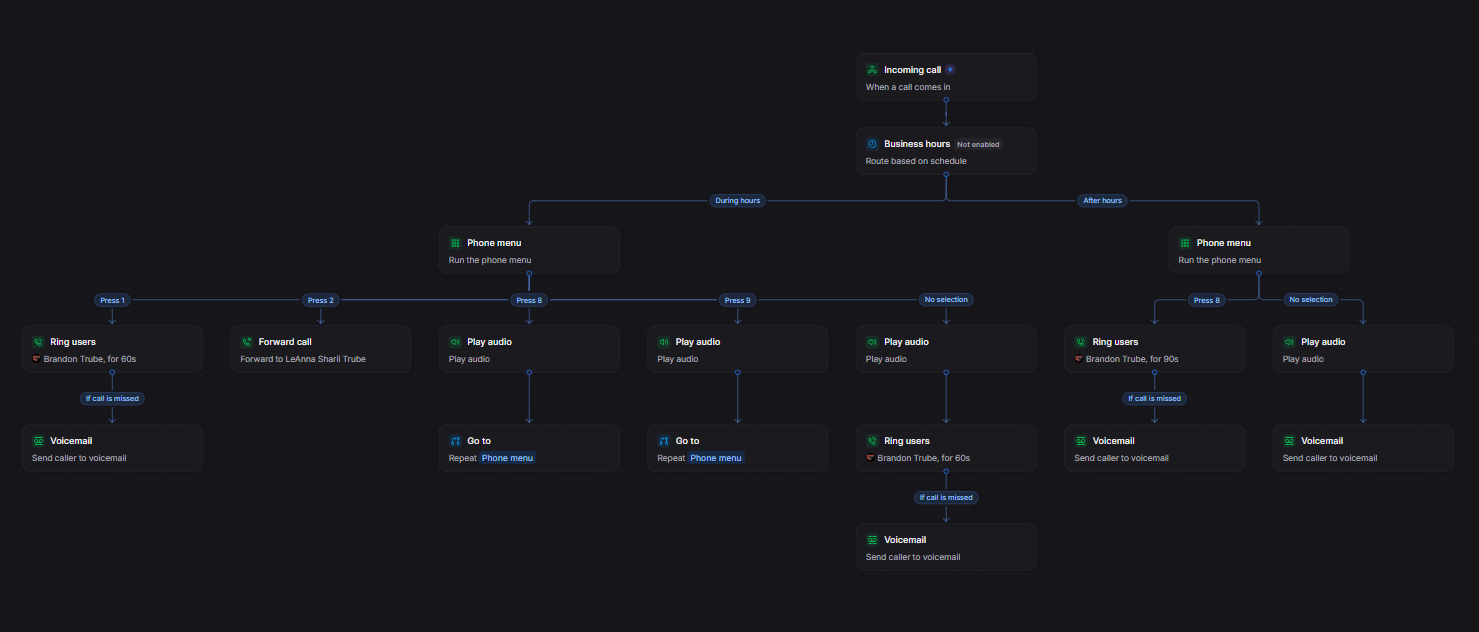
Reading the example
The building blocks
Voice AI
A phone menu makes callers sort themselves with number keys. A voice AI lets the caller just say what they need, and it answers back in a natural conversation. It is not a robot reading out a flowchart.
The assistant can answer questions, using information from your website and any documents you give it. It can take a message and arrange a callback. The conversation can be transcribed and sent to you as a transcript or condensed into short summary notes.
You can place it at any point in a call flow: at the very start, after hours, when a ring group is busy, or before voicemail. When the conversation is done, the call goes where you decide, to a person, a group or voicemail. Ask us where it fits best for your business.
What changes in practice
The owner stops being the receptionist. Callers who need a person reach one, callers who need an answer hear it, and everything else lands in voicemail. When the business changes (a new hire, a new schedule, a holiday week, a busy season) the flow changes with it. Tell us what you need and we adjust it and check that it works.
You are not limited to one call flow. We can build several and switch between them, each for its own situation:
Call flows are easy to change at any time, so your phones can respond when something unexpected happens. A storm closes the office, a key person is out sick, a pipe bursts: the flow is changed to match, and callers are handled the way you want.
We start by drawing how your calls work today, then build the flow that should replace it. If you already have a phone system, we map what it does now and tune it. If it cannot do what you need, we tell you plainly before work begins.
Start a conversation
Tell us what you need help with, but please do not include passwords, authentication codes, payment-card information, medical records, or other highly sensitive information.